仕上げ工事向け業務管理ツールAll-in-one tool for finishing trades
数量拾いから、粗利まで。 もっとスムーズに。From quantity takeoff to margin. Work more smoothly.
Qantaは、仕上げ工事業者のための積算・見積・原価・工程管理をひとつにまとめたWebアプリです。タイル工事向け標準マスタを搭載。他業種向けマスタは順次公開予定です。Qanta is an all-in-one web app for finishing trade contractors — survey, estimate, cost, and progress management. Comes with a tile trade master preset. More trade presets coming soon.
体験版に期限はありませんが、一部の機能を制限しています。あらかじめご了承ください。The trial has no time limit, but some features are restricted.
インストール不要・ブラウザだけで使えます。データはお使いのPCに保存されます。No installation required · Works in any browser · All data stays on your device.
サービス全体像Platform overview
受注から精算まで、一気通貫End-to-end project flow
各フェーズのデータが次のステップに引き継がれます。入力の二度手間なし。Data flows seamlessly from one phase to the next. No duplicate entry.
下のタブをクリックすると、各アプリの主な機能を表示します。Click a tab below to view each app's highlights.
01
SurveyサーベイSurvey
従来の手拾いに近い感覚で数量を計測・集計Measure and summarize quantities from drawings
02
Estimateエスティメート
見積内訳を作成し、原価・粗利を確認・共有Create, review, and share estimate breakdowns
03
Costコスト
材料費・工賃の実行予算を管理Manage material and labor budgets
04
Progressプログレス
工程・出来高の進捗を記録・管理Record and manage construction progress and completion
物件データはお使いのPC内に保存されます。 外部のクラウドサーバーには送信されないため、情報漏洩のリスクを最小限に抑えられます。OneDriveやDropboxなど、普段お使いのバックアップ方法をそのままご利用いただけます。Your project data stays on your own PC. Nothing is uploaded to an external cloud server, minimizing the risk of data leaks. Back it up however you already do — OneDrive, Dropbox, or anything else.
主な特徴Key features
Survey の主な機能Qanta Survey highlights
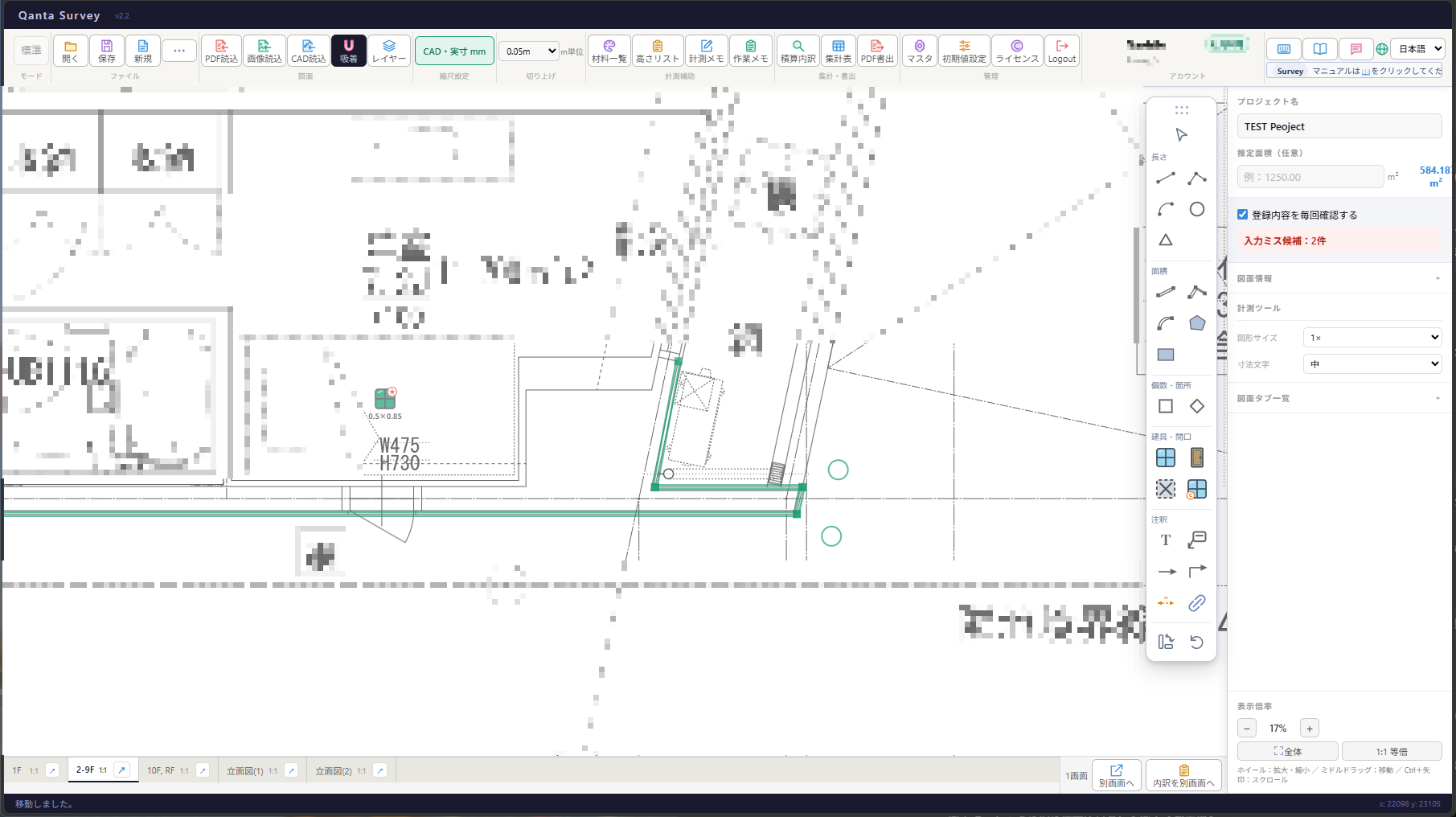
JWW・DXFのCAD図面も、スナップで正確に拾える。Take off directly from JWW and DXF CAD drawings with precise snapping.
CAD・PDF・画像の図面を取り込み、拾った数量は自動集計。翌日は、昨日の続きから。Import CAD drawings, PDFs, or images. Quantities are totaled automatically, so you can pick up tomorrow where you left off.
JWW・DXFのCAD図面を取り込み、スナップ計測Import JWW and DXF CAD drawings
JWW・DXFファイルを直接取り込み。線・端点へのスナップで、CAD図面上も正確に数量を計測できます。 ※DWG形式は現在非対応です。Import JWW and DXF files directly. Snap to lines and endpoints for accurate takeoff on CAD drawings. ※DWG format is not currently supported.
ベクターPDFのスナップ計測Snap to vector PDFs
PDF内のベクターデータを取得できる場合は、線・端点へスナップして正確に計測できます。ベクターデータを取得できないPDF(暗号化・画像化されたPDFなど)は、ラスターとして取り込みます。When vector data can be read from a PDF, you can snap to lines and endpoints for accurate measurement. PDFs whose vector data cannot be read, such as encrypted or image-based PDFs, are imported as raster images.
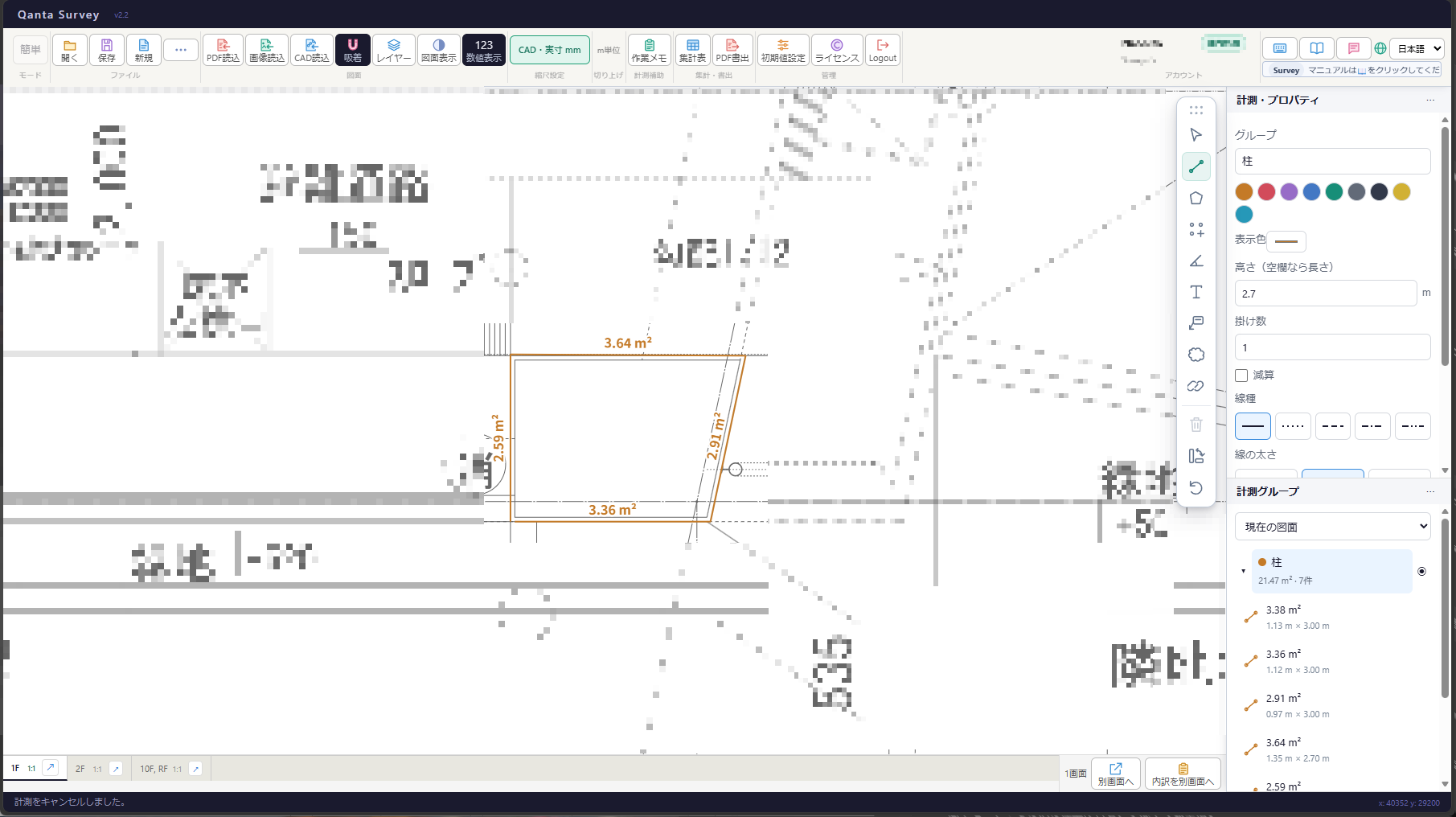
計測履歴の保存Measurement history
計測した線・図形と集計内訳が紐付いているため、後から内訳の確認・修正が簡単です。Each measurement links to its breakdown — easy to review and edit later.
2画面で図面と集計を確認Dual-pane workspace
図面を確認しながら、集計表や計測内訳を同時に操作できます。Review the drawing while working with summaries and measurement breakdowns side by side.
集計表を保存し、差異を算出Save summaries and calculate differences
集計表を保存し、保存済みの集計表との数量差異を確認できます。Save a summary, then compare it with saved summaries to calculate quantity differences.
Estimate へのデータ連携Seamless data handoff
計測データはそのままEstimateに引き継がれ、見積書作成の手間を大幅に削減します。Measurement data flows directly into Estimate — no re-entry needed.
データはお手元に保存Data stays on your device
図面・計測データはクラウドに送信せず、お使いのPCに保存されます。情報漏洩のリスクなし。Drawings and data are saved locally — never uploaded to the cloud.
ブラウザで即利用Browser-based, no install
インストール不要。上書き保存などの機能を利用するため、Chromium系ブラウザ(Chrome / Edge / Vivaldi)を推奨しています。有料契約者には、ご要望に応じてWindows用デスクトップ版も提供します。No installation. We recommend Chromium-based browsers (Chrome, Edge, or Vivaldi) for features such as overwrite saving. A Windows desktop edition is also available on request for paid subscribers.
二次元積算に幅広く対応Flexible for any 2D survey
分類を変更することで、タイル以外の二次元積算にも対応可能です。Customize categories to support any 2D quantity takeoff beyond tile.
用途に合わせて選べる2つのモードTwo modes for different workflows
タイルなどは標準モード、その他の仕上げ材は簡単モードで、作業に合わせて使い分けられます。Use Standard mode for tile work and Easy mode for other finishing materials.
標準モード:タイルなど、分類・仕様を意識した数量拾いStandard mode: detailed takeoff for tile and specification-driven work簡単モード:その他の仕上げ材を、すばやく数量拾いEasy mode: fast takeoff for other finishing materials
Surveyの積算データを取り込みImport Survey data
Surveyで拾った数量データを取り込んで、見積を作成できます。Import quantity data measured in Survey and use it to create estimates.
Excel見積内訳を取り込みImport Excel estimate breakdowns
段組みなし・二段組の見積内訳に対応。取り込む列を指定して、見積を作成できます。Import flat or two-level estimate breakdowns by selecting the columns to bring in.
階層式・フラット式の入力Hierarchical or flat entry
工種ごとにまとめる階層式と、Excelライクなフラット式を案件に合わせて選べます。Choose a hierarchical structure by trade or a flat, Excel-like layout for each project.
共有モードShared mode
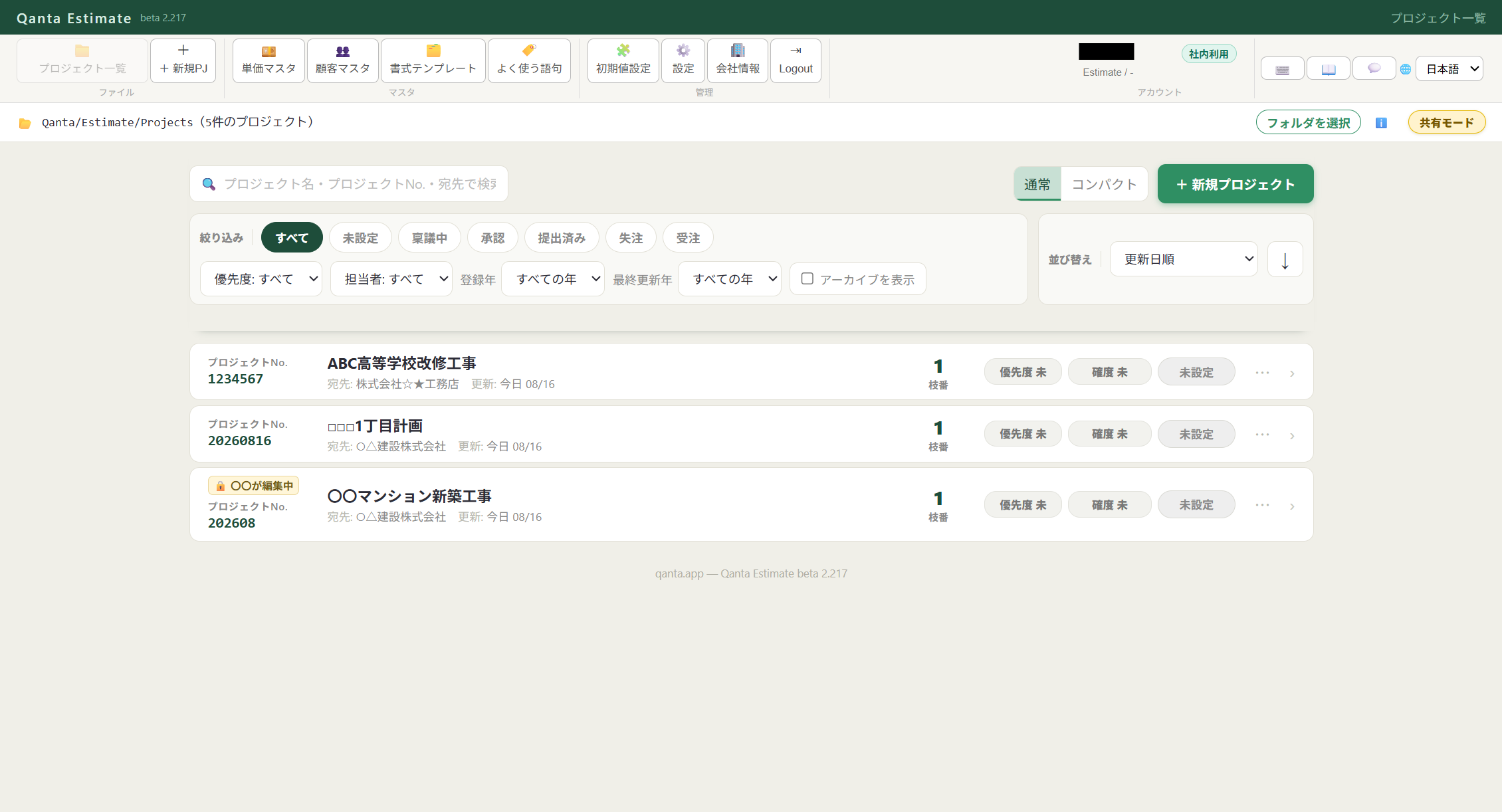
同じ企業組織に所属する企業ユーザーは、BoxやDropboxなどの共有フォルダで見積を共同管理できます。編集中はロックし、ほかの人は閲覧または編集をリクエストできます。Business users in the same organization can manage estimates together through a shared folder such as Box or Dropbox. While someone is editing, others can view or request edit access.
単価マスタ管理Unit price master
主材・副資材・工賃・諸経費などカテゴリ別に単価を登録。案件ごとに呼び出して見積に反映できます。Register unit prices by category — materials, subcontracting, labor, and more. Reuse them across every estimate.
粗利チェックMargin warnings
原価割れは赤、粗利10%未満は黄色の三角マークで自動警告。見積作成時にすぐ気づけます。Automatic warning triangles flag cost-negative items in red and thin margins (under 10%) in yellow.
Excel/ODS出力・PDF/印刷Excel/ODS export and PDF/print
Excel/ODSへの出力とPDF/印刷に対応。文字数制限により、帳票の見やすさを保ちます。Export to Excel/ODS or create PDFs and printouts, with character limits to keep documents legible.
Excel見積内訳へ書き込みWrite back to Excel breakdowns
対応するExcel見積内訳へ書き込み可能。個別書式へのVBA対応(有料)も予定しています。Write estimates back to supported Excel breakdowns. Paid VBA customization for individual formats is also planned.
実際の画面Workspace overview
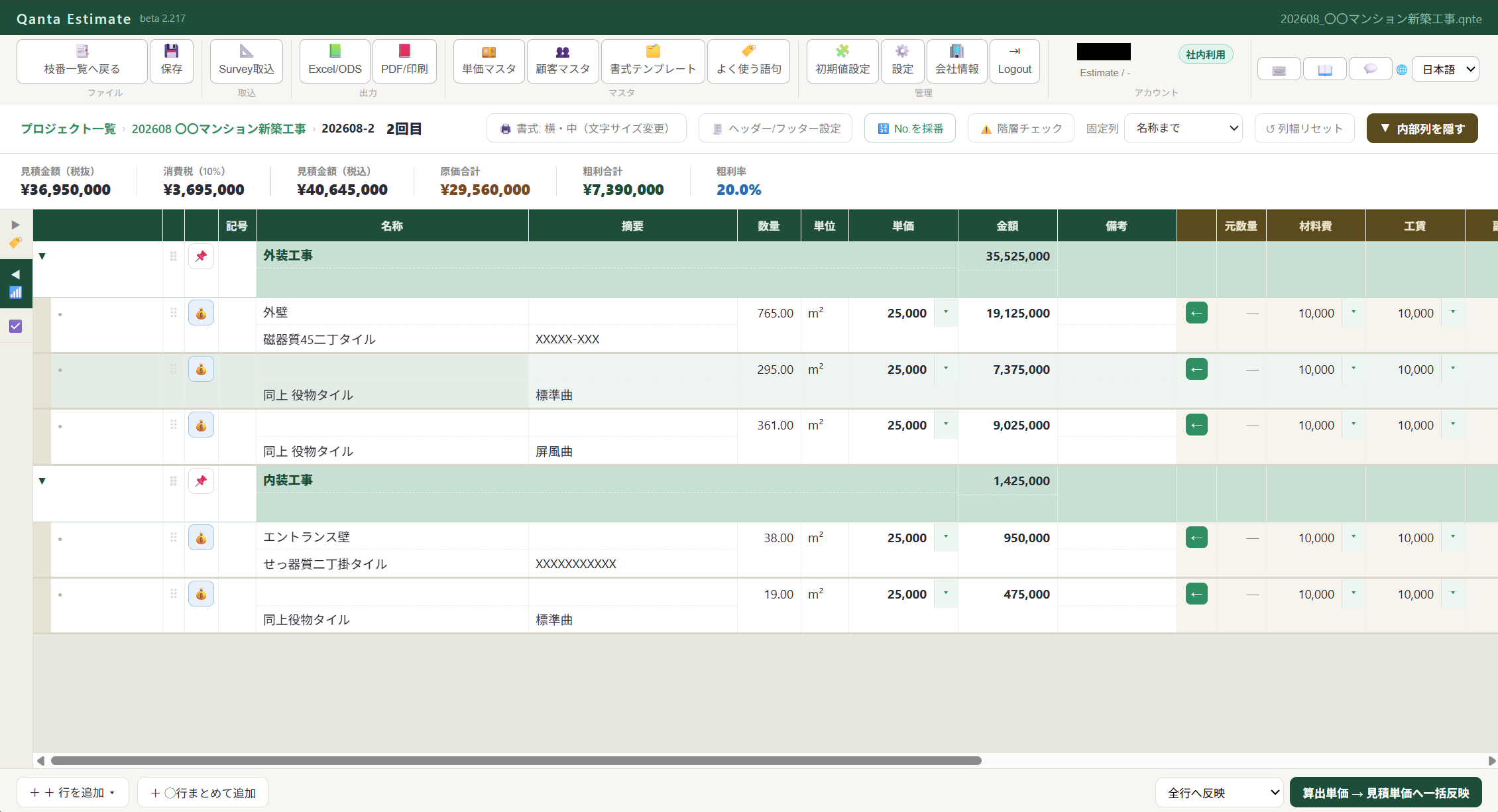
見積明細の原価・粗利確認と、共有モードのプロジェクト管理画面です。Review costs and margins in estimate details, and manage shared-mode projects.
原価・粗利を確認できる見積明細Estimate details with cost and margin review共有モードのプロジェクト一覧Shared-mode project list
※現在は日本国内の見積書式(項目分類・税表記・帳票レイアウトなど)に対応しています。海外の書式についても、ご要望があれば開発を検討します。 ※共有モードは、同じ企業組織に登録された企業ユーザー向けの機能です。BoxまたはDropboxで共有フォルダをローカルに同期して利用することを推奨します。個人ユーザー間の共有には現在対応していません。 ※Qanta EstimateはGoogle Chromeを推奨しています。Microsoft Edgeではブラウザの仕様により、上書き保存・自動保存を利用できない場合があります。※Currently formatted for Japanese estimate conventions (item categories, tax notation, document layout). International formats can be developed based on demand. ※Shared mode is currently available to business users registered in the same organization. We recommend syncing a shared folder locally through Box or Dropbox. Sharing between individual users is not currently supported. ※Google Chrome is recommended for Qanta Estimate. Due to browser limitations, overwrite saving and auto-save may not be available in Microsoft Edge.
Qanta Costは現在開発中です。公開まで今しばらくお待ちください。Qanta Cost is currently in development. Please check back soon.
Qanta Progressは現在開発中です。公開まで今しばらくお待ちください。Qanta Progress is currently in development. Please check back soon.
タイル工事向けマスタTile master preset
Surveyですぐ使える標準マスタをダウンロードDownload the ready-to-use Survey master preset
タイル工事向けの分類・仕様をまとめたJSONファイルです。ダウンロード後、Qanta Surveyのマスタ管理「復元」から読み込むと、標準マスタとして利用できます。This JSON preset contains tile-trade categories and specifications. Download it, then import it from Master Management > Restore in Qanta Survey.
このページのボタンからマスタファイルを保存します。Save the master preset from this page.
2
Surveyでマスタ管理を開くOpen Master Management
Qanta Surveyのマスタ管理画面で「復元」を選びます。In Qanta Survey, choose Restore in Master Management.
3
ファイルを読み込むImport the file
保存したJSONを選択すると、タイル工事向けマスタが反映されます。Select the saved JSON to apply the tile master preset.
無料アプリFree tools
現場で役立つ、無料のブラウザツールFree browser tools for field work
アカウント登録なしで使えます。画像ツールは端末内で処理されます。Crew Planの入力内容は計算のためサーバーへ送信されますが、サーバーには保存されません。No account is required. Image tools process files on your device. Crew Plan sends inputs to the server for calculation but does not store them on the server.
Crew Plan
工事数量から必要人数をシミュレーションSimulate crew requirements from quantities
施工数量・期間・1人工当たり施工量・自社人数を入力し、日ごとの必要人数と応援人数をグラフで確認できます。Enter the quantity, schedule, output per worker-day, and in-house crew to visualize daily crew and support requirements.
最大3期間/.crwplnファイルで保存・再開可能Up to three phases / Save and reopen .crwpln files
図面・写真の傾きをかんたん補正Straighten drawings and photos with ease
水平・垂直にしたい線をなぞるだけで、傾いた写真や図面を補正して画像として保存できます。Draw a line that should be horizontal or vertical, straighten the image or drawing, and save the corrected result.
積算はSurvey担当、見積は管理職、予算管理は施工担当など、役割に応じてアプリを個別に契約できます。同一アプリは最大10ライセンスまで契約できます。Contract each app separately based on who needs it — survey staff, estimators, or site managers. Each app can be contracted for up to 10 licenses.
※表示価格は税抜です。税込価格を各プランに併記しています。※Prices are shown before tax. Tax-inclusive prices are also listed for each plan.
Qanta Survey
¥3,980
月額(税抜)/ month excl. tax
税込 ¥4,378 / 月¥4,378 / month incl. tax
¥39,800 年額(税抜)/ year excl. tax
税込 ¥43,780 / 年¥43,780 / year incl. tax
JWW・DXFのCAD図面、PDF・画像からの数量計測・集計Quantity takeoff from JWW/DXF CAD drawings, PDFs, and images
無期限の機能制限体験版を利用可能Use the feature-limited trial with no time limit
Qanta Estimate
¥980
月額(税抜)/ month excl. tax
税込 ¥1,078 / 月¥1,078 / month incl. tax
¥9,800 年額(税抜)/ year excl. tax
税込 ¥10,780 / 年¥10,780 / year incl. tax
見積内訳作成・原価入力・粗利表示・企業組織内の共有Estimate breakdowns, costs, margins, and sharing within an organization
無期限の機能制限体験版を利用可能Use the feature-limited trial with no time limit
Qanta Cost準備中Coming soon
未定TBD
月額(税抜)/ month excl. tax
原価・予算管理Cost & budget management
Qanta Progress準備中Coming soon
未定TBD
月額(税抜)/ month excl. tax
工程・出来高管理Progress tracking
複数ライセンス契約割引Multi-license discounts
同一アプリの契約ライセンス数に応じて、3〜5ライセンス:5% / 6〜8ライセンス:10% / 9〜10ライセンス:15% 割引Discount per app based on the number of licenses: 3–5: 5% / 6–8: 10% / 9–10: 15%
※ クレジットカードは月契約・年契約のどちらにも対応しています。年契約は銀行振込もご利用いただけます。すでにご契約中の企業ご担当者様はこちらから企業アカウント管理画面にアクセスいただけます。※ Credit cards are accepted for monthly and annual contracts. Bank transfer is also available for annual contracts. Existing company administrators can access the company account management page here.